AI Voice Coach with ElevenLabs
Recording available with Main or above.
In this workshop we build Luma, a voice coach for rehearsing difficult conversations. You talk, and the coach walks you through Nonviolent Communication. By the end, you turn a complicated conflict into a clear message you can say out loud.
Links
Useful resources for this workshop:
- The investment coach bot - another conversational coach, with the evaluation setup we would reuse for Luma.
- The eval framework workshop - how to score agent output in batches, which is the basis for evaluating voice quality.
- The coding agent workshop - goes deeper into working with a coding agent the way we use Codex here.
The app you will build
A voice agent has stricter requirements than a text chat. It has to listen, detect when you finish talking, and reply without sounding robotic. It also has to let you interrupt it mid-sentence, like a real person would. Building that pipeline from scratch takes a long time, so we take a shortcut. We use ElevenLabs Conversational AI, a managed voice-agent platform that gives us the whole pipeline as one service.
A managed platform is the fastest way to a working prototype. Use it while you're still asking whether voice helps at all. Switch to a custom pipeline once you need control over latency, cost, or the model behind the coach. We pick the managed path on purpose, because testing the idea matters more than building infrastructure.
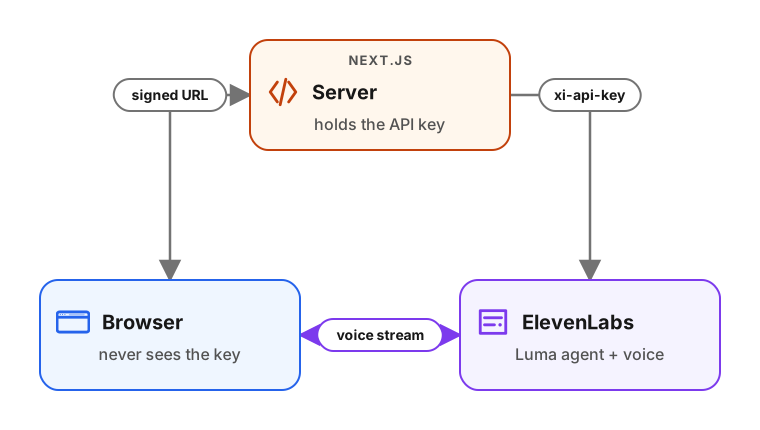
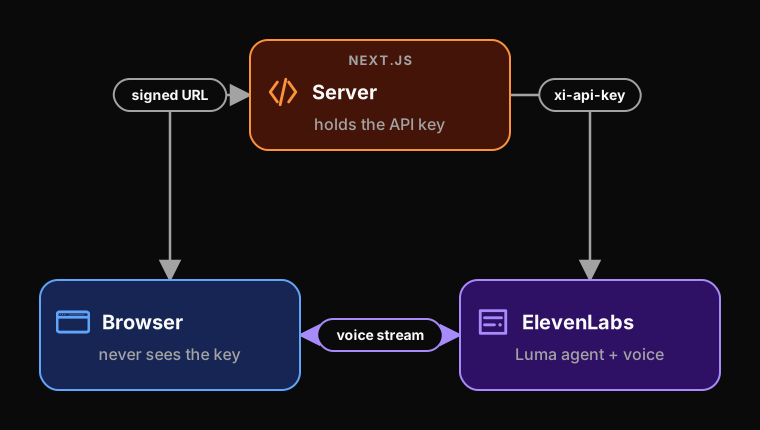
The browser never sees the ElevenLabs API key. A small Next.js server holds the key and gives the browser a short-lived signed URL for each session. The secret stays on the server while the audio streams directly to ElevenLabs.
We create the agent through the ElevenLabs API, together with the coaching prompt that makes it behave like Luma. We give the coding agent the API key, and it creates the agent for us, so we skip the dashboard entirely. Internally, ElevenLabs uses LiveKit for the real-time audio, so the same connection problems you would debug in LiveKit show up here too.
Once the voice conversation works, we add the things a real product needs. We track how much each session costs by reading ElevenLabs' recorded spend, and we let you pick a voice. We also use one more habit. Before we call anything done, we make the coding agent test the whole flow with a headless browser. This way, we don't have to click through the UI ourselves to find out it's broken.
Upgrade to Basic to access this workshop
- Full workshop overview
- Complete page list
- Step-by-step tutorial
- Cancel anytime
Tutorial pages
- Overview and setup
- Part 1: Brainstorm the architecture with ChatGPT
- Part 2: Write the NVC coaching prompt
- Part 3: Let the AI assistant create the agent
- Part 4: Build the voice conversation
- Part 5: Make the AI assistant test itself
- Part 6: Track spend and pick a voice
- Deferred items
- Q&A: side discussions
More from AI Shipping Labs
Jev for LLM Evaluations
In the batch and flex workshop we built an eval for the FAQ agent and scored it with an LLM judge. Here we swap that judge for Jev, a model that returns typed decisions instead of…
September 22, 2026
After the Interview: Offers and Negotiation
What happens after the interviews end: how to handle rejections without losing momentum, when to accept an offer, and how to negotiate salary with confidence.
September 16, 2026
The AI Engineering Field Guide
A data-driven guide to the AI engineer role: what the job involves, how the interview process works, and how to handle offers, based on 6,964 real job descriptions.
September 16, 2026